An affiliate link is a trackable URL that identifies the referring publisher and allows the advertiser or affiliate platform to attribute a qualifying action back to the right partner. Every affiliate programme runs on these links. Without them, there is no way to connect a click to a commission.

Yet affiliate links are one of those things that people assume they understand until something breaks. A redirect strips out a tracking parameter, a programme changes its URL structure overnight, or a deep link lands on a 404 page because the product was discontinued three months ago. This article covers how affiliate links actually work, how to create them properly, how to use deep linking to send users exactly where they need to go, and how to keep everything tracking once the links are live.
What is an affiliate link?
An affiliate link is a URL that contains embedded identifiers so the affiliate network or platform knows which publisher sent the traffic. When a user clicks the link, arrives on the advertiser’s website, and completes a qualifying action (a registration, a purchase, a lead form), the platform can attribute that conversion to the correct publisher and calculate the commission.
A typical affiliate link contains several components:
| Component | Purpose |
| Destination URL | The page the user lands on |
| Affiliate/publisher ID | Identifies who referred the traffic |
| Tracking ID or click ID | Unique identifier for each click event |
| Sub-ID | Optional parameter the publisher uses to segment their own traffic sources |
| Campaign ID | Groups clicks under a specific campaign for reporting |
Not every link contains all of these. The structure depends on the affiliate network or platform. A simplified example might look like this:
https://track.example-network.com/click?pid=1234&offer_id=567&sub1=review-page
The important thing is that the URL carries enough information for the platform to connect the click to the publisher, the offer, and (eventually) the conversion.
How do affiliate links work?
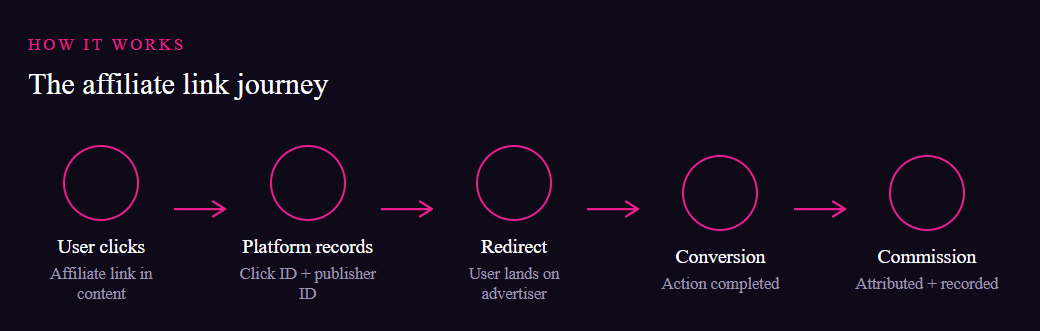
The journey is straightforward, but each step matters.
A publisher places an affiliate link within their content, whether that is a product review, a comparison article, or a resource page. When a reader clicks the link, the affiliate platform registers the click, records the publisher’s ID and any sub-IDs, and redirects the user to the advertiser’s website. The advertiser’s tracking implementation (typically a pixel, server-to-server callback, or SDK) then monitors whether the user completes the target action. If they do, the conversion is attributed to the publisher who generated the click, and the commission is recorded.
Where things get more complex is attribution. If a user clicks links from multiple publishers before converting, the platform’s attribution model determines who gets the commission. For a deeper look at how conversions are measured and attributed, the Conversion Path Attribution page explains the different models and how they distribute credit across touchpoints.
How to create an affiliate link
The exact process differs between networks and platforms, but the general steps are consistent.
- Join or get approved for the affiliate programme you want to promote.
- Log into the affiliate dashboard or platform.
- Find the advertiser or offer you want to promote.
- Select the destination page. Some platforms default to the advertiser’s homepage; others let you specify a landing page.
- Generate the tracking link using the platform’s link creation tool.
- Add sub-IDs or campaign parameters if you want to track which piece of content or traffic source generated the click.
- Test the link before publishing it. Click it yourself and confirm the redirect works and the click appears in your reporting dashboard.
- Place the link in your content and publish.
One mistake publishers make early on is skipping step seven. Testing takes thirty seconds and saves hours of troubleshooting later.
Affiliate link structure explained
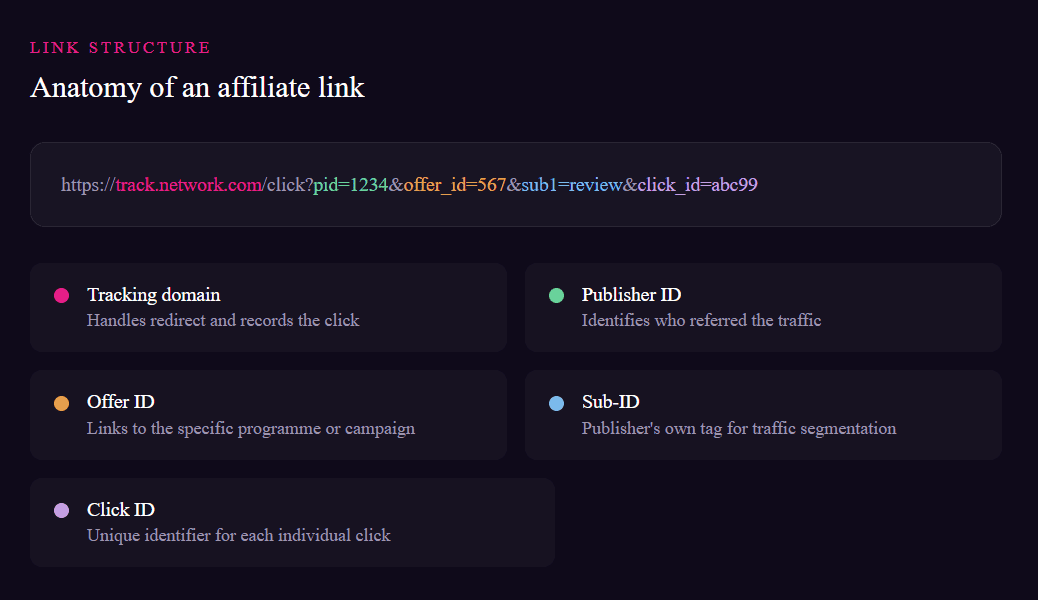
Understanding the anatomy of an affiliate URL helps when something goes wrong. If a link stops converting, knowing which part carries the tracking data tells you where to look first.
Most affiliate platforms use a tracking domain (often a subdomain of the network) that handles the redirect. The query parameters appended to that domain carry the publisher ID, offer ID, click ID, and any custom sub-IDs. Some platforms encode this information in the URL path rather than query strings, which can make the link look cleaner but works the same way.
UTM parameters (utm_source, utm_medium, utm_campaign) are separate from affiliate tracking parameters. Publishers sometimes add UTMs for their own analytics, but these do not replace the platform’s tracking. Advertisers use UTMs to see affiliate traffic in their own analytics tools, which can be useful for cross-referencing data.
What is deep linking in affiliate marketing?
Deep linking allows a publisher to send users directly to a specific page on the advertiser’s website rather than always landing them on the homepage.
Say you are writing a review of a particular investment platform’s auto-invest feature. With a standard affiliate link, you might send readers to the platform’s homepage, forcing them to navigate to the feature themselves. With a deep link, you send them straight to the auto-invest page. Fewer clicks, more relevance, less friction.
This applies to product pages, pricing pages, category pages, specific service pages, campaign landing pages, and registration pages. Anywhere on the advertiser’s site that has a URL can potentially be a deep link destination, provided the programme supports it.
Why deep linking matters
The logic is simple: if your content discusses a specific product or feature, the link should take the reader to that exact product or feature. Sending someone to a homepage after they have just read a detailed review creates a disconnect. They have to find the thing you were just talking about, and many will not bother.
Deep linking can improve relevance and may improve conversion performance. “May” is the honest word here because conversion depends on dozens of factors beyond the landing page. But reducing the gap between what the reader expects and what they see after clicking is always a step in the right direction.
For publishers running comparison sites or content-heavy blogs, deep linking is practically mandatory. Generic homepage links make your content feel lazy, and readers notice.
How to create a deep affiliate link
- Find the specific page on the advertiser’s website that you want to link to. Copy its URL from your browser.
- Check whether the programme supports deep linking. Not all do, and some restrict which pages can be used.
- Open the network or platform’s link generation tool. Most have a field where you can paste the destination URL.
- Enter the advertiser’s page URL as the destination.
- Generate the tracking link.
- Test it. Click the generated link and verify that it lands on the correct page, not the homepage or a generic fallback.
- Confirm the click is recorded in your dashboard.
- Publish the link in your content.
Some programmes restrict deep linking to certain sections of the advertiser’s site or require approval for specific URLs. If the link generator does not accept the URL you entered, check the programme terms or contact the affiliate manager.
Standard affiliate links vs deep affiliate links

| Feature | Standard affiliate link | Deep affiliate link |
| Destination | Usually the homepage or a default landing page | A specific page chosen by the publisher |
| Tracking | Yes | Yes |
| User journey | Broader, requires more navigation | More targeted, fewer steps |
| Best use | General brand promotion | Product reviews, comparisons, content-specific promotions |
| Setup effort | Minimal | Slightly more, requires finding the right URL |
A deep link is still an affiliate link. It uses the same tracking infrastructure. The only difference is where the user ends up after clicking.
How to keep affiliate links tracking
Creating links is the easy part. Keeping them working over weeks, months, and years is where most publishers fall short.
Destination pages change. Advertisers redesign their websites, retire products, and restructure URLs. A link that worked perfectly in January might redirect to a 404 page by March. Publishers who manage any meaningful volume of content need a process for auditing links regularly.
Here is what to watch for:
- Broken destination URLs. Pages get removed or moved. Check your top-performing links monthly at minimum.
- Redirect chains. Some advertisers add intermediate redirects that can strip tracking parameters. If conversions suddenly drop without an obvious traffic change, test the redirect path.
- Expired offers. Programmes close, commission structures change, and seasonal offers end. A link to a promotion that no longer exists damages credibility with your audience.
- Programme changes. Networks occasionally migrate tracking domains or update their link format. Old links may stop working.
- URL manipulation. Avoid manually editing affiliate URLs. Removing or changing query parameters can break tracking entirely.
How to test an affiliate link
Before publishing any affiliate link, run through this checklist:
- Does the URL load without errors?
- Does it land on the correct destination page?
- Are the tracking parameters visible in the URL (or encoded in the redirect)?
- Does the click appear in your affiliate dashboard reporting?
- Does the redirect complete quickly, or does it get stuck in a chain?
- Is the destination page still relevant to the content you are linking from?
- Does the programme still accept traffic?
Most affiliate platforms provide testing and preview tools. Use them. If your platform offers a link validator or a click log, check it after each test click.
Affiliate link best practices
- Use deep links whenever your content refers to a specific product, feature, or page.
- Keep anchor text descriptive. “Click here” tells the reader nothing. “Compare auto-invest options on [platform name]” tells them exactly where they are going.
- Do not overload a single article with affiliate links. If every other sentence contains a link, readability suffers and readers lose trust.
- Test links before publishing and re-test them periodically.
- Use sub-IDs to track which pieces of content generate clicks. This data is invaluable for understanding what your audience responds to.
- Disclose affiliate relationships clearly. Transparency builds trust and is required under EU consumer protection rules.
- Follow the programme’s terms. Violating terms of service can result in reversed commissions or account termination.
Where to place affiliate links
Placement should follow user intent. The reader should encounter the link at the moment they are most likely to want more information or to take action.
Product reviews and comparison articles are the natural home for affiliate links because the reader is already evaluating options. Buying guides, tutorials, and resource pages work well too, provided the links are contextually relevant. Calls to action within content should feel helpful rather than pushy.
Placing affiliate links in unrelated content, burying them in navigation menus, or disguising them as editorial links erodes trust. If the reader would not expect to find an affiliate link in a given context, it probably should not be there.
Affiliate link disclosure
Publishers across Europe should clearly disclose affiliate relationships. Under the EU’s Unfair Commercial Practices Directive, failing to disclose a commercial relationship in content that appears editorial is treated as misleading. GDPR also has implications where tracking technologies require user consent.
Good disclosure practice means telling the reader, in plain language, that the content contains affiliate links and that you may earn a commission if they click and complete an action. Most publishers place a short disclosure statement near the top of articles containing affiliate links.
This is not legal advice, and requirements can vary by jurisdiction. But transparency is both a regulatory expectation and good business sense. Readers who feel misled do not come back.
Common affiliate link mistakes
| Mistake | Why it matters | Fix |
| Linking only to homepages | Reduces relevance, increases friction | Use deep links to specific pages |
| Not testing links before publishing | Broken links earn nothing | Test every link before it goes live |
| Removing tracking parameters | Breaks attribution entirely | Never manually edit affiliate URLs |
| Using expired offers | Damages credibility with readers | Audit links monthly |
| Overloading pages with links | Hurts readability and trust | Link where it adds value, not everywhere |
| No affiliate disclosure | Risks regulatory issues and reader trust | Add a clear disclosure statement |
| Ignoring old content | Links decay over time | Schedule regular link audits |
Affiliate link management at scale
When you manage ten links, a spreadsheet is fine. When you manage hundreds or thousands across dozens of articles, you need a system.
Centralised link management means keeping a record of every affiliate link, the content it appears in, the programme it belongs to, and its current status. Publishers with large content libraries often use link management tools or plugins that can flag broken links, update URLs in bulk, and report on click performance across their entire site.
Sub-ID management becomes critical at scale too. Consistent sub-ID naming conventions let you analyse performance by content type, traffic source, or individual article without manually cross-referencing reports.
For advertisers managing programmes with many publishers, the platform’s link reporting tools show which publishers generate clicks, which deep links perform best, and where tracking gaps might exist. The beginner’s guide to affiliate marketing covers many of these programme management fundamentals.
Affiliate links and SEO
Affiliate links themselves do not automatically harm search rankings. Google’s guidance is that affiliate content should provide genuine value and that affiliate links should use appropriate link attributes (such as rel=”sponsored”) to signal their commercial nature.
Where problems arise is when content exists purely as a vehicle for affiliate links without adding any real information or editorial perspective. Thin affiliate pages with little original content have been a target for search engine quality updates for years.
If your content is useful, well-written, and genuinely helps the reader make a decision, affiliate links are a natural part of it. Focus on the quality of the content first, and the links will fit naturally.
Affiliate links and tracking technology
Affiliate platforms connect clicks to conversions using a combination of tracking IDs, browser-based identifiers, and server-side callbacks. When a user clicks an affiliate link, the platform assigns a unique click ID to that session. If the user later completes a qualifying action on the advertiser’s site, the advertiser’s tracking implementation sends that click ID back to the platform, closing the loop.
The specifics, including cookie windows, server-to-server postbacks, and attribution logic, vary by platform and implementation. For a detailed explanation of how conversions are measured and attributed, the dedicated affiliate conversion tracking article covers the technical side in depth.
Common affiliate link problems
Link does not redirect correctly. Check that the URL has not been modified, that the tracking domain is still active, and that the programme has not changed its link format. Copy the link directly from the platform rather than from your published content, as CMS formatting can sometimes alter URLs.
Click is not recorded. This could be a consent issue (if the user has not accepted tracking cookies), a browser privacy setting blocking the redirect, or an implementation problem on the platform side. Test in a clean browser session.
Conversion is not attributed. This typically requires investigation beyond the link itself, involving the advertiser’s tracking setup, the attribution model, and the conversion window. Contact the affiliate manager or network support with the click ID and timestamp.
Destination page has changed. Regenerate the link with the new URL, or create a fresh deep link pointing to the updated page. Update your content accordingly.
Tracking parameters disappear. Intermediate redirects, URL shorteners, and certain CMS plugins can strip query parameters. Test the full redirect chain to identify where the parameters are lost.
Key takeaways
- An affiliate link is a trackable URL that connects clicks to conversions and commissions.
- Deep linking sends users to specific pages and reduces friction between content and destination.
- Always test links before publishing and audit them regularly afterward.
- Use sub-IDs to understand which content and traffic sources drive results.
- Disclose affiliate relationships clearly and follow EU consumer protection requirements.
- Never manually edit affiliate URLs, as this risks breaking tracking.
- At scale, invest in link management processes or tools to prevent broken links from accumulating.
Conclusion
Effective affiliate links come down to four things: correct tracking, relevant destinations, regular maintenance, and transparent disclosure. Deep linking should be the default whenever your content discusses a specific product or page, not an afterthought. And testing is not a one-time task; it is ongoing work that directly protects your commissions.
For advertisers running affiliate programmes, reliable tracking and link management technology matters just as much. When publishers can create and test links easily, deep-link to the right pages, and trust that their clicks are being tracked accurately, they promote more actively. Platforms like Circlewise give both sides of the partnership the infrastructure to make that work across European markets.
Frequently asked questions
What is an affiliate link?
An affiliate link is a trackable URL containing a publisher’s unique identifier. When a user clicks the link and completes a qualifying action on the advertiser’s site, the affiliate platform attributes the conversion to the publisher and records the commission.
How do I create an affiliate link?
Log into your affiliate network or platform, select the advertiser or offer you want to promote, choose the destination page, and use the platform’s link generation tool. Add any sub-IDs you need for tracking, then test the link before publishing.
How do affiliate links work?
When a user clicks an affiliate link, the platform records the click and the publisher’s ID, then redirects the user to the advertiser’s website. If the user completes the target action, the advertiser’s tracking notifies the platform, which attributes the conversion and calculates the commission.
What is deep linking in affiliate marketing?
Deep linking means creating an affiliate link that sends users to a specific page on the advertiser’s website, such as a product page or pricing page, rather than the homepage. It improves relevance and reduces friction for the user.
How do I create a deep affiliate link?
Find the specific URL on the advertiser’s site, paste it into the platform’s link generator as the destination, generate the tracking URL, and test it to confirm the link lands on the correct page and the click is recorded.
How can I tell if an affiliate link is working?
Click the link in a clean browser session and verify that it redirects to the correct page. Check your affiliate dashboard to confirm the click was recorded. Most platforms also offer link testing or preview tools.
Do affiliate links expire?
Affiliate links can stop working if the programme closes, the offer is removed, the tracking domain changes, or the destination URL is updated. Links do not usually have a set expiry date, but they require regular monitoring to ensure they remain functional.
Are affiliate links good for SEO?
Affiliate links do not automatically harm SEO. Use appropriate link attributes (such as rel=”sponsored”), ensure your content provides genuine editorial value, and avoid creating pages that exist solely to host affiliate links without original content.